We have compiled a list of manufacturers, distributors, product information, reference prices, and rankings for Support Software.
ipros is IPROS GMS IPROS One of the largest technical database sites in Japan that collects information on.

Support Software Product List and Ranking from 184 Manufacturers, Suppliers and Companies

Last Updated: Aggregation Period:Jan 07, 2026~Feb 03, 2026
This ranking is based on the number of page views on our site.

Support Software Manufacturer, Suppliers and Company Rankings

Last Updated: Aggregation Period:Jan 07, 2026~Feb 03, 2026
This ranking is based on the number of page views on our site.

  1. 日本生工技研 Tokyo//software
  2. TOMITA CO.,LTD. Tokyo//Service Industry
  3. ジーボックス Mie//software
  4. 4 誠伸商事 本社 Tokyo//Trading company/Wholesale
  5. 5 アイビーリサーチ Niigata//software

Support Software Product ranking

Last Updated: Aggregation Period:Jan 07, 2026~Feb 03, 2026
This ranking is based on the number of page views on our site.

  1. VISOMETRY Corporation AR Visual Inspection Support Software Twyn TOMITA CO.,LTD.
  2. Integrated Management Support Software for the Printing Industry 'Print Kan Taro XI' 誠伸商事 本社
  3. [DX Promotion] Advanced Work Analysis and Improvement Tool 'Time Prism' 日本生工技研
  4. 4 設備巡回点検の属人化を脱却!【AirSNAP】 タック株式会社(イビデングループ) 営業統括部 産業・公共営業グループ
  5. 4 Medication Management Guidance Support System "MedicaLab" アイシーエム

Support Software Product List

1~30 item / All 357 items

Displayed results

[Case Study] Itoki Corporation

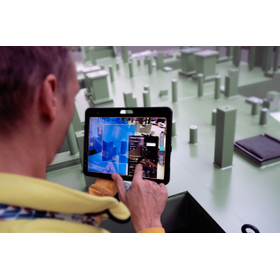
Utilizing "MREAL" to streamline the planning and design process of office furniture.

We are introducing a case study of the implementation of MR technology at Itohki Co., Ltd. As a professional company in office creation, Itohki has significantly contributed to the development of offices in Japan. The company has utilized "MREAL" to streamline the planning and design process of office furniture. This has resulted in reduced time and costs until product release, as well as improved design quality. After implementation, effects such as "a reduction in mock-up production, leading to decreased time and costs until product release" and "the ability to compare multiple proposals, resulting in improved design quality" were achieved.

Added to bookmarks

Bookmarks list

Bookmark has been removed

Bookmarks list

You can't add any more bookmarks

By registering as a member, you can increase the number of bookmarks you can save and organize them with labels.

Free membership registration

I want to enable newcomers to create processing programs in a short period of time.

Task: "I want to enable newcomers to create processing programs in a short period of time."

The manufacturing industry is currently facing various challenges. One of the challenges is the aging workforce. With the retirement of veteran employees, it becomes difficult to maintain the quality of work when the skills and know-how developed over many years are lost. Additionally, there is the reality that there is not enough time to invest in training new employees.

  • 3D CAD
  • 3D CAM
  • Support Software

Added to bookmarks

Bookmarks list

Bookmark has been removed

Bookmarks list

You can't add any more bookmarks

By registering as a member, you can increase the number of bookmarks you can save and organize them with labels.

Free membership registration

It is not possible to divide the mold for complex model shapes like an engine block.

Issue: "It is not possible to divide the mold for complex model shapes like an engine block."

Once the mold shaping data is prepared, the work of mold splitting begins. Various systems are equipped with different functions to separate the core and cavity. For example, there are functions for gradient angle analysis to detect undercut areas, as well as features that automatically create parting lines and parting surfaces. Cimatron also comes standard with corresponding analysis functions and the ability to create parting surfaces in its model design application. However, for models with complex shapes, mold splitting requires very challenging work, and even highly skilled operators cannot easily achieve the separation.

  • 3D CAD
  • 3D CAM
  • Support Software

Added to bookmarks

Bookmarks list

Bookmark has been removed

Bookmarks list

You can't add any more bookmarks

By registering as a member, you can increase the number of bookmarks you can save and organize them with labels.

Free membership registration

CAD Data Comparison Time Reduction Tool "Shukusho Bugyo"

Automatically compare old and new drawings! A time-saving tool for design work that allows you to create change instruction drawings even without CAD software.

The "Red Marking Executive" is a time-saving tool for design work that compares old and new drawings (DWG, DXF files) and automatically creates change instruction drawings even without CAD. ■ Do you have these concerns? ■ It's hard to identify the areas of design changes. Human corrections can lead to omissions in noting changes. Handwritten entries take too much time. It's difficult to understand unless you are experienced. Change areas are highlighted with cloud marks for better visibility. Additionally, deleted shapes are marked with a deletion mark (X), and deleted text is indicated with a strikethrough line, making the changes immediately clear. ■ Features ■ ▼ Automatically identifies changes in drawings and creates change instruction documents. - Displays additions, deletions, and changes in text values for comparison objects. 【Comparison Objects】 Points, line segments, circles, arcs, ellipses, polylines, splines, text, multi-text, dimension lines, hatching, and the shapes and attributes of symbols (blocks). *For more details, please refer to the PDF materials or feel free to contact us.

  • Other embedded systems (software and hardware)
  • 2D CAD Construction
  • 2D CAD Electrical
  • Support Software

Added to bookmarks

Bookmarks list

Bookmark has been removed

Bookmarks list

You can't add any more bookmarks

By registering as a member, you can increase the number of bookmarks you can save and organize them with labels.

Free membership registration

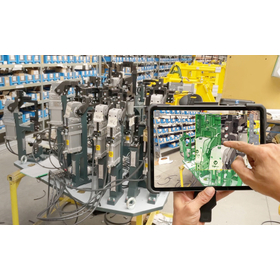
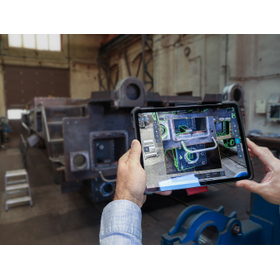
VISOMETRY Corporation AR Visual Inspection Support Software Twyn

Software that assists in the appearance inspection of large and complex shapes, also automatically generates inspection reports.

Software that displays 3D CAD data of products on an iPad and overlays it with the actual object captured by a camera, allowing for comparison and discovery of discrepancies between the data and the physical item. Discovered discrepancies can be recorded in terms of location and condition through freehand drawing, and a photo report can be automatically generated. Key inspection points and areas that require special attention can be set in advance, and by displaying caution instructions on the screen, work time can be reduced. Until now, even visual inspections that required skilled labor can be performed with high accuracy with only minimal training. Typical applications: ✓ Large sheet metal parts ✓ Canned structures ✓ Large jigs - Used for inspections during processes, before shipment, and upon receipt. It helps to identify mistakes arising from forgotten part installations, processing omissions, positional differences, and mix-ups of drawing versions, thereby improving the accuracy of visual inspections and promoting labor-saving measures.

  • 2021-02_SVK_Costumer_Slavia Productions_Jig and Fixture.jpg
  • 2023-10_CSZ_Customer_Loko_IMG-4973.jpg
  • 2024-01_SVK_Customer_SlaviaProductions_DSCF0082.jpg
  • Image Processing Software
  • Support Software

Added to bookmarks

Bookmarks list

Bookmark has been removed

Bookmarks list

You can't add any more bookmarks

By registering as a member, you can increase the number of bookmarks you can save and organize them with labels.

Free membership registration

Expert Series of Package Software

Digitalizing picking operations! ~Short delivery times, low costs, easy operation~

This is the ideal package software for transitioning from paper (list) picking to digital picking. It supports picking tasks not only in factories, such as picking for parts delivery and assembly in a cell production system, but also in all environments where people handle goods, such as warehouses and logistics centers. ■ Searching for items while comparing the work list and the shelves on-site alone ■ Needing two people, one to read the list and the other to work, to improve efficiency ■ Wanting to implement a digital picking system but having limited time for implementation This software addresses the challenges faced in such environments.

  • Other conveying machines
  • Support Software

Added to bookmarks

Bookmarks list

Bookmark has been removed

Bookmarks list

You can't add any more bookmarks

By registering as a member, you can increase the number of bookmarks you can save and organize them with labels.

Free membership registration

TPS-13 Inspection Program Creation Support Software

Contributes to reducing operator workload and improving inspection efficiency with intuitive and easy-to-understand operations.

This is a highly versatile workstation software that automatically generates inspection programs for Takaya flying probe testers from easily accessible mount data. It features user-friendly operability that anyone can handle in a short time and pursues functionality that accommodates various inspection purposes. Features: - Real map (actual board image) capture screen display, making it easy to identify defective areas and confirm contact positions. - Simple operation for data conversion, with one-touch support. - Comprehensive support features such as component shape/area specification and automatic probe selection. We are also happy to accept program creation tests and inspection demonstrations. Please contact our sales representative for inquiries.

  • Circuit Board Inspection Equipment
  • Support Software

Added to bookmarks

Bookmarks list

Bookmark has been removed

Bookmarks list

You can't add any more bookmarks

By registering as a member, you can increase the number of bookmarks you can save and organize them with labels.

Free membership registration

Mountain Management Support Software "OWL Construction"

Create longitudinal and cross-sectional diagrams (with equal spacing possible)! Output to DXF files for CAD systems.

We would like to introduce our soil conservation support software, "OWL Construction." Using the tree, ground, and 3D point cloud data obtained from OWL, it is possible to assist in design and construction. It is also easy to confirm the location and number of trees that may obstruct construction. Longitudinal and cross-sectional drawings (with equal intervals possible) can be created and output as DXF files for CAD systems. 【Features】 ■ Assists in design and construction using tree, ground, and 3D point cloud data ■ Easy to confirm the location and number of trees *For more details, please download the PDF or feel free to contact us.

  • Other CAD related software
  • Support Software

Added to bookmarks

Bookmarks list

Bookmark has been removed

Bookmarks list

You can't add any more bookmarks

By registering as a member, you can increase the number of bookmarks you can save and organize them with labels.

Free membership registration

Material Procurement Planning Support Software 'OWL Processor'

Forecasting log yield and price (income) in standing timber condition! Visualization of assets is also possible.

We would like to introduce our timber planning support software, 'OWL Processor'. Based on the standing tree data (diameter at breast height, tree height, shape) and log market prices obtained from OWL, it predicts the volume and price (income) of logs to be harvested while the trees are still standing. This can be used for visualizing assets and calculating operational profitability. Please feel free to contact us if you have any inquiries. 【Features】 ■ Predicts the volume and price of logs to be harvested based on standing tree data and log market prices ■ Can be used for visualizing assets and calculating operational profitability *For more details, please download the PDF or feel free to contact us.

  • Other information systems
  • Support Software

Added to bookmarks

Bookmarks list

Bookmark has been removed

Bookmarks list

You can't add any more bookmarks

By registering as a member, you can increase the number of bookmarks you can save and organize them with labels.

Free membership registration

Business Revenue and Expenditure Planning Support Software "OWL Report2"

Material procurement plan collaboration type! Aggregation by area allocation of multiple plots is possible.

We would like to introduce our operational revenue and expenditure planning support software, 'OWL Report2'. By launching the harvesting plan software within OWL Report, it is possible to automatically calculate the income in the operational plan. The basic format of the planning document is in Excel format, allowing customers to freely set the default values. 【Features】 ■ Multiple plot aggregation function ■ Multiple screen allocation function ■ Harvesting plan execution function ■ Cultivation plan output function ■ Operational plan creation function *For more details, please download the PDF or feel free to contact us.

  • Other information systems
  • Support Software

Added to bookmarks

Bookmarks list

Bookmark has been removed

Bookmarks list

You can't add any more bookmarks

By registering as a member, you can increase the number of bookmarks you can save and organize them with labels.

Free membership registration

Business Revenue and Expenditure Planning Support Software "OWL Report"

The format of the plan can be customized according to the customer's requests!

We would like to introduce our management support software for operational revenue and expenditure planning, 'OWL Report'. You can read in the stand survey data and standing tree data obtained from OWL, allowing for a consistent process up to the operational revenue and expenditure plan. It is also possible to aggregate stand survey data from multiple plots of small compartments proportionally based on their area. The format of the plan can be customized according to the customer's requests. 【Features】 ■ Load stand survey data analyzed with OWLManager specified by small compartment units ■ Aggregation through area proportional distribution of multiple plots ■ It is also possible to recalculate volume and biomass by adding any correction calculation formulas ■ Automatically calculate amounts and totals based on input values such as coefficients *For more details, please download the PDF or feel free to contact us.

  • Other information systems
  • Support Software

Added to bookmarks

Bookmarks list

Bookmark has been removed

Bookmarks list

You can't add any more bookmarks

By registering as a member, you can increase the number of bookmarks you can save and organize them with labels.

Free membership registration

QuarkXPress to InDesign Conversion Service

Would you like to migrate your "QuarkXPress" data, which is losing support, to the industry-standard "InDesign"?

The QuarkXPress (Ver. 3.3/4.1) data, which is still essential due to revisions and other factors, is gradually losing the environment in which it can be launched. Therefore, we propose converting these legacy data into InDesign documents to adapt them to the latest environment. 【Benefits of InDesign Conversion】 ◆ As it is the industry-standard software, there are many users, expanding the options for data acceptance. ◆ For the time being, it is not affected by changes in the environment. ◆ It has rich editing features, leading to a reduction in work time. ◆ It allows for functional enhancements such as automatic update settings (table of contents, cross-references, index). After conversion, we will thoroughly support you in improving accuracy through differential verification with Proof Checker PRO. *For details of the service, please refer to the catalog materials available for download as a PDF.

  • Company:NA-MU
  • Price:Other
  • Printing/Publishing
  • Catalog and manual creation
  • Document and Data Management
  • Support Software

Added to bookmarks

Bookmarks list

Bookmark has been removed

Bookmarks list

You can't add any more bookmarks

By registering as a member, you can increase the number of bookmarks you can save and organize them with labels.

Free membership registration

設備巡回点検の属人化を脱却!【AirSNAP】

スマートフォンを活用して、手軽に点検作業をデジタル化 問題発見から措置対応までの漏れの無い点検を実現

安全衛生点検の仕組みの”変革” ヘルメット装着カメラ×生成AIから始める点検作業 【特徴】 1.安全衛生に関する点検の標準化     スマートフォンを活用して、手軽に点検作業をデジタル化 2.点検作業を簡単にデジタル化    指差確認した場面を写真記録/文書化 3.誰でも使いやすいクラウドパッケージ    現場毎の管理で元受け・下請けどちらでも使いやすい仕組みです!

  • Surveillance Camera System
  • Other information systems
  • Support Software

Added to bookmarks

Bookmarks list

Bookmark has been removed

Bookmarks list

You can't add any more bookmarks

By registering as a member, you can increase the number of bookmarks you can save and organize them with labels.

Free membership registration

Security business support software

The keyword is predictive maintenance! Maintenance operations support software.

By digitizing maintenance tasks such as creating abnormal reports (repair requests), work instructions, and work reports, as well as managing work schedules including regular maintenance, we aim to facilitate information sharing and support the inheritance of maintenance technology and the efficiency of maintenance work. With the integration of our monitoring software "Bravo," it is possible to continuously monitor the condition of production equipment, enabling automatic reporting of abnormalities, predictive maintenance, and easy cause analysis. 【Features】 ◆ Accurately conveys the movements on-site through continuous monitoring. ◆ Automatically reports to expedite maintenance tasks. ◆ Reads PLC internal devices to clarify the causes of abnormalities. ◆ Easily searches past records to strengthen work instructions. ◆ Samples data to predict anomalies. ◆ Saves data to analyze the necessity of regular maintenance tasks. ◆ Contributes to improving quality control through data analysis.

  • Production Management System
  • Process Control System
  • Support Software

Added to bookmarks

Bookmarks list

Bookmark has been removed

Bookmarks list

You can't add any more bookmarks

By registering as a member, you can increase the number of bookmarks you can save and organize them with labels.

Free membership registration

Instantly solve geometric tolerance questions! The era when 3D CAD tools become educators.

No need to worry if you don't have knowledge of specifications! We support practical GD&T education.

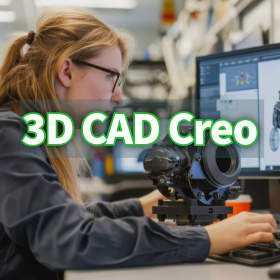
The Creo GD&T Advisor Extension is not just a tool for checking tolerances; it is also a powerful educational platform with rich help content built in. Even designers who are unfamiliar with GD&T standards can acquire knowledge while progressing with their work. If questions or errors arise regarding the application of GD&T during design, help can be accessed with a simple right-click on the messages displayed in the Advisor Tree. This help feature provides detailed information on the principles of GD&T, interpretations of the standards, and specific solutions to errors. As a result, designers can refer to the standards and acquire GD&T knowledge in a practical context without interrupting their work. This feature eliminates the hassle of flipping through standard documents and allows for immediate access to correct information, significantly contributing to the improvement of GD&T skill levels across the entire design team. Examples of tutorials are also included. For more details on the helpful features that aid in knowledge acquisition, please refer to the documentation. *For more information, please download the PDF or feel free to contact us.*

  • 3D CAD
  • Support Software

Added to bookmarks

Bookmarks list

Bookmark has been removed

Bookmarks list

You can't add any more bookmarks

By registering as a member, you can increase the number of bookmarks you can save and organize them with labels.

Free membership registration

I'm glad I found out about the convenient features of "eYACHO for Business."

Expectations for improved efficiency, transparency, and fraud prevention in approval request management!

We would like to introduce the convenient features of "eYACHO for Business Appendix" that we handle. For matters requiring approval in business processes, it is possible to request approval from the approver. You can apply protection to notes created by the approver's authority to prevent tampering. Additionally, with the spreadsheet function, if you create a template that allows for automatic calculations, you can complete reports such as "Attendance Sheets" simply by entering numbers on-site. It is also possible to create graphs from the entered values. 【Convenient Features (Partial)】 ■ Approval Request Excerpt Management (Approval View) ■ Digital Ruler for Drawings ■ Spreadsheet Function ■ Template Creation Support Utilizing Image Recognition AI Technology ■ Full Text Search *For more details, please download the PDF or feel free to contact us.

Added to bookmarks

Bookmarks list

Bookmark has been removed

Bookmarks list

You can't add any more bookmarks

By registering as a member, you can increase the number of bookmarks you can save and organize them with labels.

Free membership registration

Delivery Planning System 【Delivery Desk】

It is a standalone dispatch support software that allows anyone to easily calculate the optimal dispatch plan with the minimum number of vehicles.

The automatic vehicle dispatching by computer minimizes the number of vehicles needed. As a result, it becomes possible to reduce transportation costs. By utilizing VICS traffic information processed with our unique know-how, we can calculate optimal routes and required times with higher accuracy, taking into account traffic conditions that were difficult to consider in conventional delivery planning systems (considering date types and time zones). It can be used as a simulator not only for daily operations but also for reviewing delivery routes due to changes in the number of delivery destinations or delivery conditions. With simple operations, anyone can create delivery plans in a short time.

  • Other information systems
  • Support Software

Added to bookmarks

Bookmarks list

Bookmark has been removed

Bookmarks list

You can't add any more bookmarks

By registering as a member, you can increase the number of bookmarks you can save and organize them with labels.

Free membership registration

System-level multi-board design environment "Design Force"

Revolutionary electromechanical collaborative design realized by the potential of Design Force.

The overwhelming power given to "Design Force" and the dynamic editing through the three-dimensional vertical structure within the substrate strongly support designers even in the design of the latest technologies such as inner-layer mounted components and 3D mounting. Additionally, it has become possible to edit, verify, and modify designs as a system, including multiple substrates that contain different design targets and connection parts such as chips, packages, and substrates. 【Features】 ○ Actively adopts the latest technologies → Supports multi-CPU and multi-threading → Utilizes a 3D graphics engine (GPU) → 64-bit native support, etc. ○ Dramatically improves computational processing, display speed, and operational performance ○ Thoroughly re-evaluated user interface For more details, please contact us or download the catalog. *This catalog is in English.

  • Other information systems
  • Other CAD related software
  • Support Software

Added to bookmarks

Bookmarks list

Bookmark has been removed

Bookmarks list

You can't add any more bookmarks

By registering as a member, you can increase the number of bookmarks you can save and organize them with labels.

Free membership registration

AI tool "DFMPro"

A useful educational tool for design beginners! A self-check tool for busy designers.

DFMPro is an AI tool that automatically checks and verifies design data, promoting design standardization. In the early stages of design, it encourages diverse designs by allowing free thinking in shape exploration without getting caught up in details, and by finishing based on DFM's suggestions regarding manufacturability and cost. Additionally, it allows for the creation and operation of necessary drawing inspection rules specific to the company. By ensuring reliable checks through the system, it reduces rework and contributes to cost reduction through outputs that consider manufacturability. 【Features】 ■ Supports designers' free thinking ■ Reduces rework with reliable checks ■ Enhances design quality and lowers education costs ■ Verification is possible even with models that have no history ■ Customizable rules in accordance with company standards *For more details, please refer to the PDF materials or feel free to contact us.

  • others
  • Support Software

Added to bookmarks

Bookmarks list

Bookmark has been removed

Bookmarks list

You can't add any more bookmarks

By registering as a member, you can increase the number of bookmarks you can save and organize them with labels.

Free membership registration

Statistical design support software

Statistical design support software

In addition to conventional functions, we have incorporated user requests such as the addition of a visual display feature for response surfaces, and we have added the Taguchi method functionality to meet the demand for use not only in the design field but also in quality control. This allows for optimization across a wider range of fields. 1. Taguchi Method Functionality We have added a function to calculate the S/N ratio and sensitivity based on error factors, enabling optimization calculations that consider robustness. 2. Factor Effect Diagram Drawing Function Displays a factor effect diagram, allowing for a side-by-side comparison of the effects of factors on characteristics. This graph can also be used in the Taguchi method to confirm the effects of factors on the S/N ratio and sensitivity. 3. 3D Display Function for Response Surface Approximation Formula Displays the response surface approximation formula (estimation formula) for characteristics in a bird's-eye view, allowing for a visual examination of the impact of each factor on the characteristics. 4. Compatibility with Windows 2000 Compatible with Windows 2000 Professional (some limitations on printing functionality). [Features] - Adoption of a new response surface method. - Designed with the concept of being "easy to handle." - An optimization system with excellent cost performance. - Applicable in various fields such as machinery, chemistry, and medicine. - Capable of addressing nonlinear problems.

  • Other analyses
  • simulator
  • others
  • Support Software

Added to bookmarks

Bookmarks list

Bookmark has been removed

Bookmarks list

You can't add any more bookmarks

By registering as a member, you can increase the number of bookmarks you can save and organize them with labels.

Free membership registration

DX tool "dbSheet EX11"

Build a DX promotion system utilizing Excel! By using WebAPI, it will connect directly to your system.

"dbSheet EX11" is a DX tool that utilizes Excel. It allows for input and updates via smartphones and tablets, enabling real-time information sharing and automatic aggregation of categorized data. Additionally, it has a proven track record of integration with Salesforce and SAP, allowing for linkage with core systems and enabling budget management. 【Features】 ■ Data is centrally managed in a database (SQL or Oracle) ■ Excel templates are also centrally managed on the server ■ Cloud usage of the server is possible ■ Development is done with low-code ■ Input is possible via web browsers using APIs ■ Seamless integration with other systems is possible *For more details, please download the PDF or feel free to contact us.

  • 4-2.png
  • Development support tools (ICE, emulators, debuggers, etc.)
  • Support Software

Added to bookmarks

Bookmarks list

Bookmark has been removed

Bookmarks list

You can't add any more bookmarks

By registering as a member, you can increase the number of bookmarks you can save and organize them with labels.

Free membership registration

"Creating Land Area Measurement Information XML" Optional Feature [Explained in Video]

Detailed steps to create land measurement information XML!

"Creating Land Measurement Information XML" is an optional feature of Wingneo INFINITY. In this video, we detail the steps to create Land Measurement Information XML using Wingneo INFINITY Ver4, including attaching information related to coordinates (point attributes, stake attributes, triangulation points, permanent features, etc.), assigning attributes to boundary lines, and outputting the XML file. [Video Introduction] - Attribute assignment in coordinate management for Land Measurement Information XML - Compiling into a drawing worksheet - Adding tables and attribute edits in CAD - Writing the Land Measurement Information XML file *For more details, please refer to the PDF materials or feel free to contact us.

  • Other measurement, recording and measuring instruments
  • Software (middle, driver, security, etc.)
  • Support Software

Added to bookmarks

Bookmarks list

Bookmark has been removed

Bookmarks list

You can't add any more bookmarks

By registering as a member, you can increase the number of bookmarks you can save and organize them with labels.

Free membership registration

"Compensation Amount Calculation Document: Land" Optional Feature [Explained in Video]

Compensation Calculation Statement: Introducing the process from initial land setup to data entry and preview printing!

The 'Compensation Amount Calculation Sheet: Land' is an optional feature of WingneoINFINITY. In this video, we introduce the flow from the initial setup (standard amount, templates, etc.) of the Compensation Amount Calculation Sheet: Land in WingneoINFINITY Ver4 to data input and preview printing, as well as data creation support referencing surveying data within the INFINITY site. [Video Introduction] ■ Initial setup of compensation amount calculation: Land (standard amount, templates, etc.) ■ Data input for compensation amount calculation: Land ■ Preview: Compensation amount calculation sheet, estimates, etc. ■ Integration with INFINITY surveying data *For more details, please refer to the PDF materials or feel free to contact us.

  • Other measurement, recording and measuring instruments
  • Software (middle, driver, security, etc.)
  • Support Software

Added to bookmarks

Bookmarks list

Bookmark has been removed

Bookmarks list

You can't add any more bookmarks

By registering as a member, you can increase the number of bookmarks you can save and organize them with labels.

Free membership registration

"Online Registration Application" Optional Feature [Explained in Video]

Creating data for online real estate registration application - A video explanation of the application process!

The "Online Registration Application" is an optional feature of "WingneoINFINITY" that allows for the creation of data for online real estate registration applications and submission. In this video, we introduce two methods: applying using the Ministry of Justice's comprehensive software after creating the application data, and a convenient application method utilizing the INFINITY option. [Video Introduction (Excerpt)] - Setting up field information (e.g., building title registration) - Creating cases and importing attached documents - Sticky note function, etc. *For more details, please refer to the PDF materials or feel free to contact us.

  • Other information systems
  • Other CAD related software
  • Support Software

Added to bookmarks

Bookmarks list

Bookmark has been removed

Bookmarks list

You can't add any more bookmarks

By registering as a member, you can increase the number of bookmarks you can save and organize them with labels.

Free membership registration

Visualize customer interest! Business card management and sales support (SFA) tool.

Integration of "New Business Development," "Business Card Management (Customer Management)," and "Sales Support (SFA)" in the corporate database. Realization of sales strategies utilizing customer data.

Hot Profile is a cloud-based business card management and sales support tool designed to increase sales. It enables the digitalization of the entire sales process in a one-stop solution. 【We can solve the following issues】 ■ It is difficult to grasp the activity status of sales representatives without asking them directly. ■ Customer information is managed individually by sales personnel, making information sharing challenging. ■ We want to find a way to transfer customer connections known by sales representatives. ■ We are missing out on follow-ups for existing customers due to manageable cases. ■ We want to increase the number of high-probability business negotiations. *For more details, please refer to the PDF document or feel free to contact us.

  • SFA/Sales Support System
  • Support Software

Added to bookmarks

Bookmarks list

Bookmark has been removed

Bookmarks list

You can't add any more bookmarks

By registering as a member, you can increase the number of bookmarks you can save and organize them with labels.

Free membership registration

Equipped with a corporate database. "Hot approach" for sales targeting specific companies.

Cold calling 500 companies in 3 minutes. A 'form sales tool' that allows you to target specific companies for sales.

You can create opportunities to introduce good products and services to more companies. <PR Points> ★ You can select target companies based on attributes and size from a "corporate database" of over 4.7 million companies and create an approach list.  <For example, you can create a list of potential new clients like this:>  Based on the information published on the websites of the companies you want to approach, you can create lists such as:  ・Companies promoting DX (Digital Transformation)  ・Manufacturing companies dealing with 3D printers, with a workforce of 300 to 1,000 employees, and experiencing sales growth  ・Companies in Kyushu that have call centers and also have inquiry contact points

  • SFA/Sales Support System
  • Database
  • Data Search Software
  • Support Software

Added to bookmarks

Bookmarks list

Bookmark has been removed

Bookmarks list

You can't add any more bookmarks

By registering as a member, you can increase the number of bookmarks you can save and organize them with labels.

Free membership registration

[DX Promotion] Advanced Work Analysis and Improvement Tool 'Time Prism'

A must-see for those struggling with skill and technology transfer on-site! We contribute to IE improvement/TPS improvement by creating video manuals!

"Time Prism" is an improvement support software that captures work on video and conducts work analysis while playing back the footage on a computer. It was developed with the aim of allowing anyone to engage in improvement activities by recording videos during regular manufacturing operations, efficiently identifying bottlenecks on the shop floor, and discovering improvement measures. It provides solid support for improvement activities even without specialized improvement personnel. New features have been added to the video editing function to contribute to further improvements. 【Features】 ■ Work Analysis: Visualization ■ Comparative Verification: Skill Transfer ■ Standard Manual Creation: Work Education ■ Work Arrangement and Standard Work Combination Table (M.M.C) Creation: Work Improvement ■ Time Prism Sharing (New Feature) ■ Creator Function * For more details, please refer to the PDF materials or feel free to contact us. * Additionally, we are currently offering materials that summarize columns and the latest exhibition information!

  • TimePrismサブ画像20200301.png
  • IPROS23540240758171733945.png
  • Production Management System
  • Support Software

Added to bookmarks

Bookmarks list

Bookmark has been removed

Bookmarks list

You can't add any more bookmarks

By registering as a member, you can increase the number of bookmarks you can save and organize them with labels.

Free membership registration

Work Analysis and Improvement Tool Software Time Prism Implementation and Utilization Case Studies

Achieve visibility of work with easy operation! Introducing case studies on the use of Time Prism that leads to improvement.

We would like to introduce the case studies of the implementation and utilization of the advanced work analysis and improvement tool "Time Prism." "Time Prism" is software designed to support work analysis, allowing for simple work analysis while playing back video files on a PC, making it easy to obtain the data necessary for visualizing work. This document includes case studies of its implementation and utilization in various fields such as telecommunications equipment manufacturing, electrical and electronics, equipment industry, and apparel manufacturing. [Contents] ■ Solutions ■ Policies ■ Implementation case studies *For more details, please refer to the PDF document or feel free to contact us.

  • Production Management System
  • Support Software

Added to bookmarks

Bookmarks list

Bookmark has been removed

Bookmarks list

You can't add any more bookmarks

By registering as a member, you can increase the number of bookmarks you can save and organize them with labels.

Free membership registration